Free Social Media Content Calendar Template
A ready-to-use content calendar framework with a filled-in example week across LinkedIn, Instagram, and X. Copy the structure, customize your topics, and start posting consistently.
No credit card · 7-day free trial · From $19/mo

What Is a Social Media Content Calendar Template?
A social media content calendar template is a pre-built framework that organizes your upcoming posts by date, platform, content type, and status. Instead of starting from scratch every week, a template gives you a repeatable structure you can fill in with your own topics and messaging. Most social media managers use spreadsheets, but the format matters less than the consistency it creates. Hootsuite's Social Trends research found that brands with a documented content plan see significantly higher engagement rates than those posting without a system. A template is the simplest way to create that system without hiring a strategist or spending hours on planning software.
The template on this page is designed for small businesses and solo professionals managing one to three platforms. It follows the same structure that our full content calendar guide recommends: content pillars for topic focus, a balanced mix of educational and promotional posts, and platform-specific formatting. If you want a deeper explanation of the strategy behind the template, that guide covers the 70/20/10 framework and posting frequency best practices in detail.
The biggest advantage of using a template is that it eliminates the daily question of what to post. When you sit down on Monday morning, your topics, platforms, and content types are already decided. You just need to write and schedule. According to Sprout Social's research, consistent posting frequency is one of the top factors in social media algorithm performance, and a calendar template is the most practical way to maintain that consistency week after week without burning out.
How to Use This Content Calendar Template
Follow these four steps to turn the template below into a working content plan for your business. Each step builds on the previous one, and the whole process takes about 30 minutes for your first week.
Pick Your Platforms
Choose one to three platforms where your audience is most active. The example below covers LinkedIn, Instagram, and X (Twitter), but you can swap in Facebook, Threads, Pinterest, or any other platform. Starting with fewer platforms and posting consistently is better than spreading yourself thin across six channels.
Define Your Content Pillars
Content pillars are three to five core topics your business can consistently create around. For example, a marketing agency might use: industry tips, case studies, team culture, and tool recommendations. Every post should connect back to one of these pillars. Our content strategy page explains how to define yours.
Fill in the Calendar
Using the example week below as a reference, fill in each day with a content type, topic, and draft copy for each platform. Alternate between educational, engagement, and promotional content to keep your feed balanced. Aim for the 70/20/10 mix: 70% value, 20% community, 10% promotion.
Schedule and Publish
Once your calendar is filled in, schedule your posts using a publishing tool. You can do this manually on each platform, or use social media automation to schedule everything from one dashboard. SocialBotify handles steps 2 through 4 automatically.
Example Week: Filled-In Content Calendar
Here is what a completed content calendar looks like for a digital marketing agency posting across LinkedIn, Instagram, and X. Use this as a starting point and swap in your own topics and brand voice.
| Day | Type | X (Twitter) | ||
|---|---|---|---|---|
| Mon |
Educational
|
Long-form post: "3 SEO mistakes small businesses make (and how to fix each one)" | Carousel: 5 slides breaking down each SEO mistake with a visual fix | Thread: "Most small biz websites make these 3 SEO mistakes. Here's how to fix them (thread):" |
| Tue |
Case Study
|
"How we helped a local bakery increase foot traffic 40% with Google Business posts" | Before/after graphic with key metrics overlay | "Local bakery. Zero social presence. We ran Google Business posts for 60 days. Result: +40% foot traffic." |
| Wed |
Engagement
|
Poll: "What's your biggest marketing challenge right now? A) Time B) Budget C) Ideas D) Consistency" | Story poll with the same question + swipe-up link to free resource | "What's the #1 thing holding back your marketing? Reply below -- curious what everyone's dealing with." |
| Thu |
Industry Tip
|
"Instagram just updated their algorithm again. Here's what changed and what it means for your reach." | Reel: 30-second explainer on the algorithm change with text overlay | "Instagram algorithm update (March 2026): Reels get 2x the reach of static posts now. Here's what to do about it." |
| Fri |
Behind the Scenes
|
"Our team just wrapped a strategy sprint for Q2. Here's one thing we learned about content batching." | Photo of team whiteboard + caption about the planning process | "Friday wins: just batched 3 weeks of content for a client in one afternoon. Content batching is underrated." |
This example follows the 70/20/10 mix: mostly educational content, some engagement, and light promotion woven into value posts.
What Should Your Content Calendar Include?
Every content calendar needs a consistent set of columns to be useful. Without the right fields, your calendar becomes a list of ideas rather than an actionable plan. The columns below cover what most social media professionals track, whether they use a spreadsheet, a project management tool, or a dedicated scheduling platform. HubSpot recommends including at minimum the date, platform, copy, media type, and publishing status in any content calendar, and we agree. These six fields give you enough structure to plan efficiently without making the calendar so complex that updating it becomes a chore.
Date & Time
When the post goes live. Include the time if you are scheduling to specific time slots for maximum reach.
Platform
Which platform this post is for. Each platform gets its own row or column so you can tailor the content.
Content Type
Educational, engagement, promotional, behind-the-scenes, etc. Tracking the type ensures you maintain a healthy mix.
Post Copy
The actual text of the post, written for the specific platform. LinkedIn posts differ from tweets in length and tone.
Media / Visual
Image, carousel, video, or text-only. Note the file name or link so you can find it when scheduling.
Status
Draft, approved, scheduled, or published. This keeps your workflow clear when multiple people are involved.
Why Not Just Use SocialBotify Instead?
Templates are a great starting point, but they still require you to come up with topics, write every post, adapt the content for each platform, and manually schedule everything. That process takes most people 5 to 10 hours per week. SocialBotify automates the entire content calendar workflow: it generates topics based on your content pillars, writes platform-specific posts in your brand voice, selects relevant images, and schedules everything to publish at the optimal time. You review and approve rather than create from scratch.
Think of it this way: this template gives you the structure, but SocialBotify fills it in for you automatically, every single week. The example calendar above is exactly the kind of output SocialBotify produces, tailored to your specific business and industry. Instead of copying a template into a spreadsheet, you can have a fully populated content calendar ready for review in minutes.
AI-Written Posts
Content generated in your brand voice, adapted for each platform automatically.
Auto-Scheduling
Posts scheduled to your connected accounts. No copying and pasting between apps.
10 Platforms
LinkedIn, X, Instagram, Facebook, Threads, Bluesky, Pinterest, Reddit, Google Business, Telegram.
No credit card required · Plans from $19/mo
Content Calendar Template FAQ
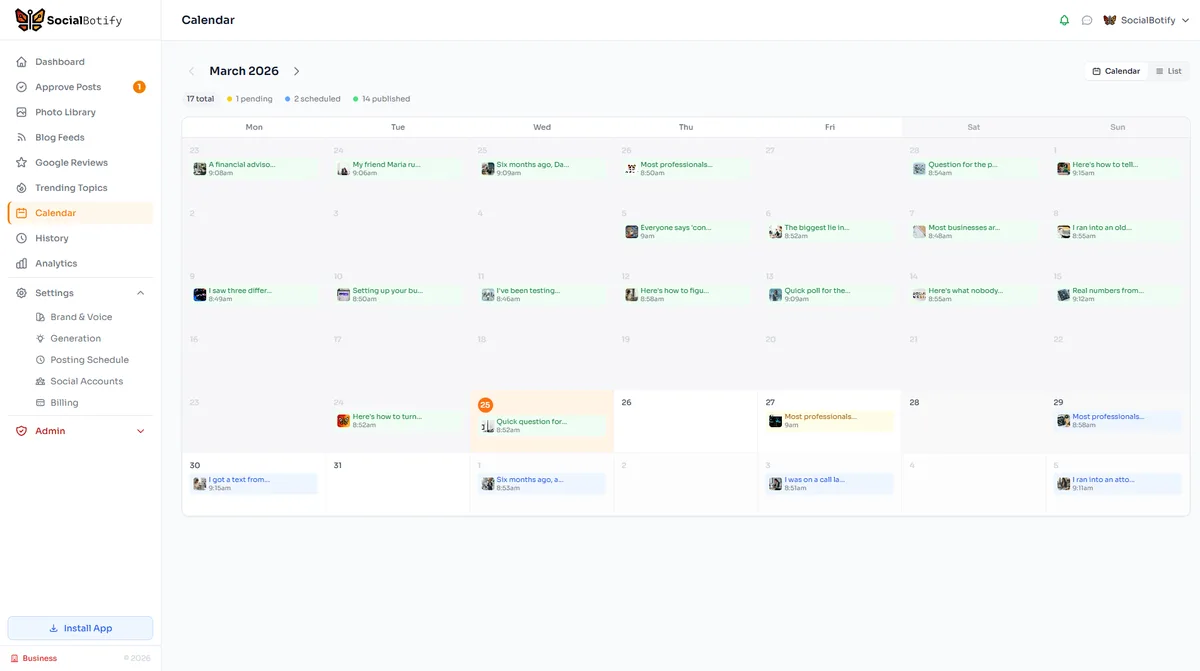
Skip the Spreadsheet. Automate Your Calendar.
SocialBotify generates a full week of platform-optimized content in minutes. No templates to fill in, no posts to write manually.
No credit card required · Cancel anytime