How to Build a 30-Day Social Media Content Calendar Using AI
Stop staring at a blank screen every week. This step-by-step guide shows you how to plan, organize, and automate 30 days of social media content, saving you 10+ hours per month.
No credit card · 7-day free trial · From $19/mo

Step 1: Define Your Content Pillars
Content pillars are the three to five core topics your business can consistently create valuable content around. They keep your messaging focused and prevent the common trap of posting randomly about whatever comes to mind. Every piece of content you publish should connect back to one of your pillars.
Research from Hootsuite's Social Trends report shows that brands with a documented content strategy see 2.5x higher engagement rates compared to those posting ad hoc. Content pillars are the foundation of that strategy.
To find your pillars, ask yourself: What questions do my clients ask most frequently? What topics establish my expertise? What problems does my business solve? The intersection of your expertise and your audience's needs is where your pillars live.
Example: Content Pillars for a Financial Advisor
Step 2: Choose Your Posting Frequency
Different platforms have different engagement patterns and audience expectations. Posting once a week on X (Twitter) will get you nowhere, but posting daily on LinkedIn can actually hurt your reach. According to Sprout Social's data, consistent posting frequency is one of the top three factors in social media algorithm performance.
Here are the recommended posting frequencies based on platform best practices and algorithm behavior:
| Platform | Recommended | Why |
|---|---|---|
 LinkedIn
 |
2-3x / week | Algorithm favors quality over quantity |
 X (Twitter)
 |
1-2x / day | Fast-moving feed, short content lifespan |
 Instagram
 |
3-4x / week | Visual focus, Reels extend reach |
 Facebook
 |
3-5x / week | Moderate pace, engagement-driven |
 Pinterest
 |
3-5x / week | Evergreen content, searchable pins |
 Threads /
  Bluesky
 |
3-5x / week | Growing platforms reward consistency |
The key insight: consistency matters more than volume. Posting three times per week every week is far more effective than posting ten times one week and then going silent for two weeks. Your content calendar should reflect a sustainable cadence you can actually maintain.
Step 3: Apply the 70/20/10 Framework
The 70/20/10 rule is the content mix framework used by top brands and social media strategists. It prevents the common mistake of being too promotional (which kills engagement) or too generic (which fails to convert). This mix sits inside a broader social media content plan and is the framework that SocialBotify uses automatically when generating your content.
Educational & Value
Tips, how-tos, industry insights, and practical advice that helps your audience. This builds trust and establishes expertise.
Example: "5 tax deductions most freelancers miss"
Shared & Curated
Industry news, relevant articles, peer content, and community engagement. This shows you are part of the conversation, not just broadcasting.
Example: "Great article by @expert on market trends"
Promotional
Direct offers, service announcements, testimonials, and calls to action. Because you have earned trust with the other 90%, these convert better.
Example: "Free consultation this month for new clients"
Content Marketing Institute research confirms that audiences disengage from brands that post more than 20% promotional content. The 70/20/10 framework keeps your feed valuable enough that people actually want to follow you, while still driving business results with the 10% that promotes your services.
Get the Free 30-Day Content Calendar Template
Download our ready-to-use template with the 70/20/10 framework already built in. Fill in your topics and start posting this week.
Download Free Template →Step 4: Fill Your Calendar with Weekly Themes
Instead of deciding what to post each day from scratch, assign a theme to each day of the week. This makes content planning systematic rather than creative, which is exactly what you want when you are trying to maintain consistency across multiple platforms.
Here is a weekly theme structure that works well for most professional service businesses:
Thought Leadership
Share an original perspective on an industry topic. Position yourself as the expert. LinkedIn-first, adapt for other platforms.
Practical Tip
One actionable tip your audience can implement today. Keep it specific and useful. These tend to get saved and shared.
Industry News or Commentary
Share a relevant article or trend with your professional take. This is your 20% curated content. Add value with your perspective, do not just reshare.
Engagement Question
Ask your audience a question related to your industry. Polls, open-ended questions, or "what would you do?" scenarios drive comments and algorithm visibility.
Light or Personal
Behind-the-scenes, team highlights, weekend plans, or a lighter take on your industry. This humanizes your brand and performs well heading into the weekend.
Curated Content or Rest
Share a useful resource, book recommendation, or podcast episode relevant to your audience. Or take the weekend off and let your weekday content work for you.
Step 5: Automate with AI
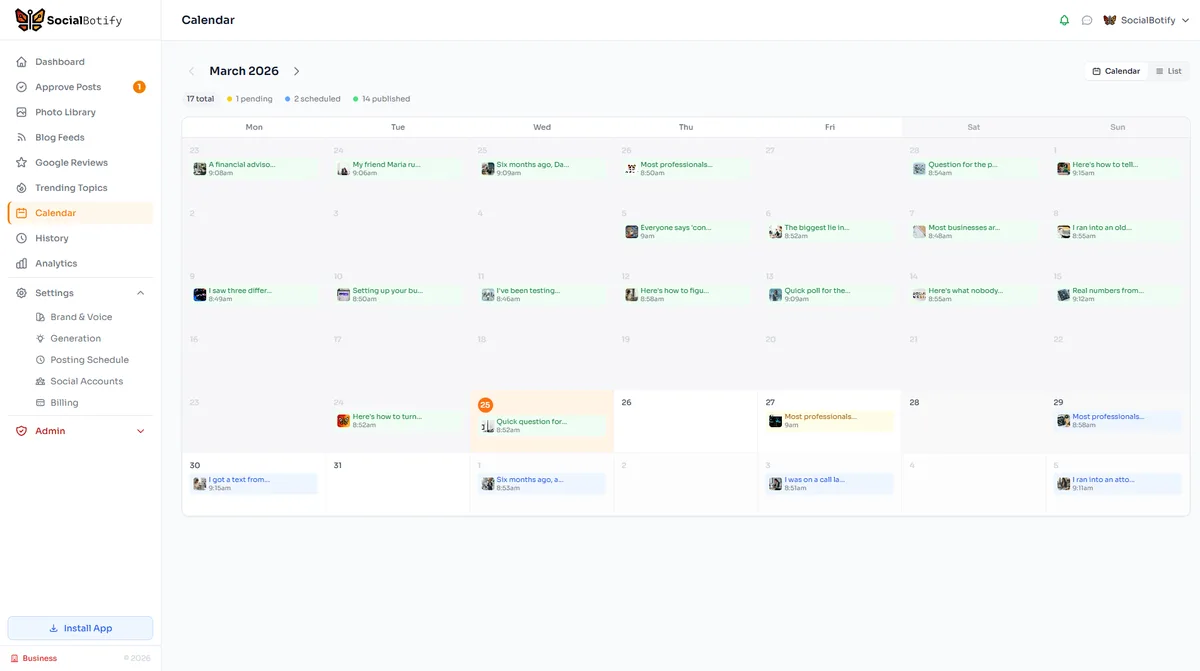
Steps 1 through 4 give you a solid framework, but executing it manually every week still takes hours. This is where AI changes the equation. Instead of sitting down each week to brainstorm topics, write posts, find images, and adapt content for each platform, you can let AI handle the entire workflow.
SocialBotify's AI post generator automates each step of the content calendar process:
Topic Generation
AI selects topics from your content pillars, ensuring variety and relevance. No more brainstorming sessions.
Brand Voice Writing
Every post matches your unique tone and style. The AI analyzes your existing content and website to learn how you communicate.
Image Selection
Automatically selects relevant stock photos or generates AI images. No more hunting through Unsplash or Canva.
Platform Adaptation
One post becomes ten. The AI adapts tone, length, and format for LinkedIn, X, Instagram, Facebook, and six more platforms.
The result: your 30-day content calendar fills itself. You spend about five minutes per week reviewing and approving posts instead of hours writing them. The AI follows the 70/20/10 framework, rotates through your content pillars, and applies the daily theme structure automatically. Learn more about how social media automation can transform your workflow.
Free 30-Day Content Calendar Template
Here is a sample Week 1 layout using the daily theme structure and 70/20/10 framework. Repeat this pattern for weeks 2-4, rotating through your content pillars.
| Monday | Tuesday | Wednesday | Thursday | Friday |
|---|---|---|---|---|
|
Thought Leadership
"3 market shifts every business owner should prepare for this quarter"
70% - Educational
|
Practical Tip
"Quick tip: Set up automatic savings transfers on the 1st and 15th of each month"
70% - Educational
|
Industry News
"Great analysis by @industry_expert on the new tax regulations. Here is what it means for small businesses..."
20% - Curated
|
Engagement
"What is the biggest financial mistake you see business owners make? I will share my top 3 tomorrow."
70% - Educational
|
Personal / Light
"Our team just finished Q1 planning. Grateful for the growth this year. Happy Friday!"
70% - Value
|
Rotate content pillars each week. Week 2 might lead with client success stories instead of market insights.
Content Calendar FAQ
Ready to Build Your Calendar?
Grab our free 30-day content calendar template with daily themes, platform-specific posting schedules, and the 70/20/10 framework pre-built.
Get the Free Template →Let AI Build Your Content Calendar
Stop spending hours planning and writing. SocialBotify generates a full week of platform-optimized content in minutes.
No credit card required · Cancel anytime