Social Media Automation for Small Businesses: The Complete Guide
What to automate, what to keep human, and how to save 5+ hours every week.
No credit card required · 7-day free trial · Plans from $19/mo
Key Takeaways

What Should You Automate (And What Should You Keep Human)?
The biggest mistake small businesses make with automation is treating it as all-or-nothing. Some tasks are perfect for automation because they are repetitive, time-consuming, and do not require contextual judgment. Other tasks require a human touch because they involve empathy, nuance, or real-time decision-making. Here is the breakdown according to a 2025 Sprout Social report on automation best practices.
Automate These
- ● Content creation — AI writes posts in your brand voice
- ● Scheduling — posts publish at optimal times automatically
- ● Cross-platform publishing — one post adapted for each platform
- ● Image selection — relevant visuals matched to content
- ● Content strategy — topic mix follows proven frameworks
Keep These Human
- ● DM responses — personal conversations need a human touch
- ● Crisis communication — tone-deaf auto-posts during a crisis damage trust
- ● Customer complaints — automated replies to complaints feel dismissive
- ● Community engagement — replying to comments should feel genuine
- ● Sensitive topics — anything involving controversy needs human judgment
What Does Social Media Automation Look Like for Different Small Businesses?
Every business has different platform needs and content requirements. Here are three common scenarios with specific automation strategies for each.
Solo Consultant
No marketing team
- Platforms: LinkedIn + 1-2 others
- Frequency: 2 posts/week
- Focus: Thought leadership, credibility
- Time saved: 3-4 hrs/week
LinkedIn is the primary revenue driver. Every post should demonstrate expertise and attract inbound leads. Automation handles the writing so you focus on client work.
Local Service Business
Plumber, dentist, realtor, etc.
- Platforms: Google Business + Facebook + Instagram
- Frequency: 3 posts/week
- Focus: Local visibility, trust, reviews
- Time saved: 4-6 hrs/week
Google Business posts boost local search rankings. Facebook and Instagram build community trust. Content should mix helpful tips, behind-the-scenes, and customer success stories.
E-commerce Brand
Online store, DTC product
- Platforms: Instagram + Facebook + Pinterest + Twitter
- Frequency: Daily posting
- Focus: Product-adjacent content, lifestyle
- Time saved: 8-10 hrs/week
Content should not be all product shots. Mix lifestyle tips, industry trends, and customer stories. Pinterest drives evergreen traffic. Automation makes daily multi-platform posting sustainable.
How Do You Set Up Social Media Automation Step by Step?
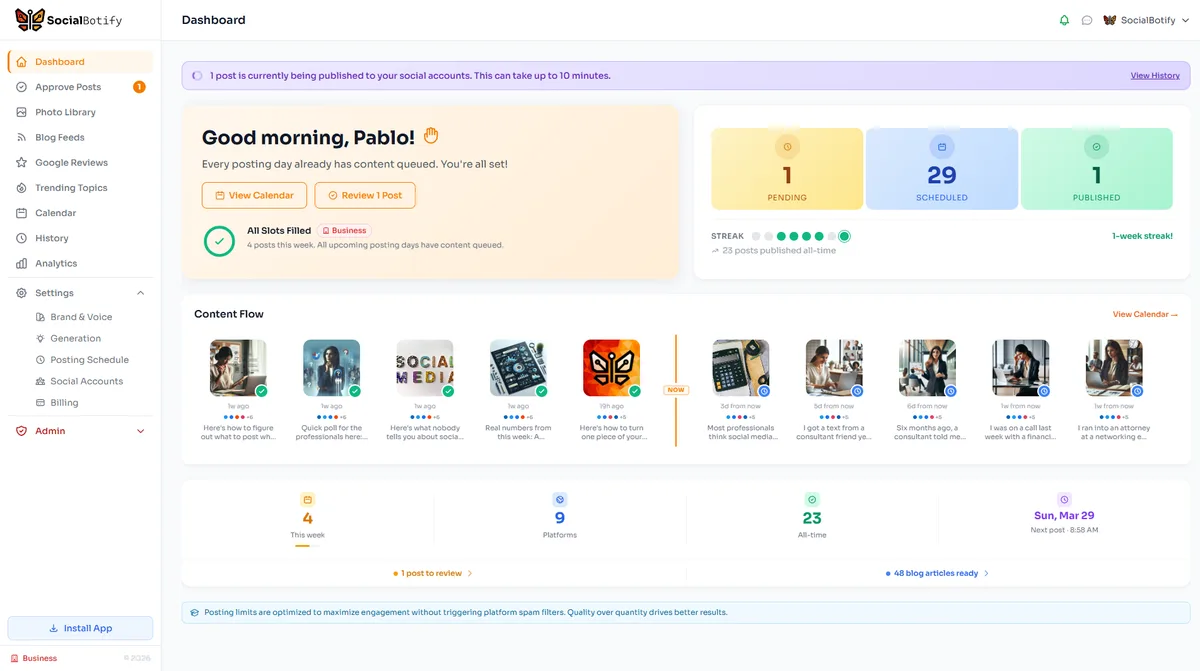
Getting started with full social media automation takes about 10 minutes. Here is the process using SocialBotify, though the general steps apply to any automation tool. The key difference with SocialBotify is that it creates the content for you rather than just scheduling posts you have already written.
Create Your Brand Profile (5 minutes)
Enter your website URL and SocialBotify analyzes your business to detect your industry, services, target audience, and natural tone. You can adjust keywords, style preferences, and words to avoid so the AI matches your voice precisely.
Connect Your Social Accounts (2 minutes)
Link your LinkedIn, Instagram, Facebook, Twitter, or any of the 10 supported platforms. Each connection takes one click through the standard OAuth flow. Your credentials are never stored directly.
Set Your Posting Schedule (2 minutes)
Choose which days and times you want to post on each platform. SocialBotify suggests optimal times based on platform research, but you can customize everything to match your audience.
AI Generates Your First Batch (automatic)
The AI creates platform-specific posts following your content strategy. Each post is adapted for the platform it will appear on, with the right length, format, and tone. Images are selected or generated automatically.
Review and Approve (5 minutes/week)
See all generated posts in your dashboard. Edit anything inline, reject posts with feedback for regeneration, or approve the entire batch. Nothing publishes without your explicit approval. The weekly review takes about five minutes.
How Much Time Does Social Media Automation Actually Save?
The time savings depend on which type of tool you use. Here is a realistic comparison based on maintaining a 3-posts-per-week schedule across 3 platforms, drawn from a 2025 Social Media Examiner survey of 1,500 small business owners.
Manual Approach
5-10
hours/week
Writing, designing, logging into each platform, posting manually
Scheduling Tool
3-5
hours/week
You still write everything; tool handles scheduling and publishing
Full Automation
~5
minutes/week
AI creates content; you just review and approve
At the manual rate, you spend 260-520 hours per year on social media. That is 6-13 full work weeks. Even a basic scheduling tool still costs you 156-260 hours annually. Full automation with a tool like SocialBotify reduces the annual investment to approximately 4 hours total. For a solo business owner billing $150/hour, that time savings translates to $39,000-$78,000 in recovered billable hours per year.
How Do You Choose the Right Social Media Automation Tool?
The market for social media tools is crowded, but they fall into two distinct categories: scheduling tools that publish content you have already created, and full-automation tools that create and publish content for you. The right choice depends on whether your bottleneck is publishing or content creation. For most small businesses, the bottleneck is content creation itself.
| Feature |  Buffer
 |
 Hootsuite
 |
 SocialBotify
 |
|---|---|---|---|
| AI content creation | Basic AI assistant | OwlyWriter AI | Full auto-generation |
| Brand voice matching | No | Limited | Yes, auto-analyzed |
| Content strategy | No | No | Built-in 70/20/10 |
| Scheduling | Yes | Yes | Yes |
| Weekly time required | 3-5 hours | 3-5 hours | ~5 minutes |
| Starting price | $6/mo per channel | $99/mo | $19/mo (3 platforms) |
Buffer and Hootsuite are excellent scheduling tools if you enjoy writing your own content and just need help with the publishing workflow. SocialBotify is designed for business owners who want the entire content pipeline handled automatically. For a deeper comparison, see our Buffer alternative page.
Frequently Asked Questions
Want AI posts that sound like you? Read our guide on AI LinkedIn posts that don't sound like AI.
Get Your Social Media Running on Autopilot
SocialBotify creates, schedules, and publishes your social media content. You just review and approve once a week.
Start Your Free Trial →No credit card required · Cancel anytime