How to Schedule LinkedIn Posts
Scheduling LinkedIn posts lets you plan professional content in advance, publish at peak engagement windows, and maintain a consistent presence without interrupting your workday. This guide walks you through the complete process in five steps.
No credit card · 7-day free trial · From $19/mo
Why Schedule LinkedIn Posts Instead of Posting Manually?
LinkedIn is a professional network where consistency directly translates into visibility and opportunity. Unlike social platforms where content disappears in hours, a single LinkedIn post can generate impressions for days because the algorithm resurfaces high-engagement content in followers' feeds long after publication. But capturing that algorithmic boost requires publishing at the right time and doing it regularly, which is nearly impossible when you are posting on the fly between meetings.
Hootsuite's 2026 Social Trends report found that brands with a consistent LinkedIn posting schedule see significantly higher engagement rates than those publishing sporadically. The reason is straightforward: the algorithm prioritizes content from accounts that demonstrate regular activity. When you schedule posts ahead of time, you lock in that consistency without relying on willpower or open calendar slots.
Scheduling also improves content quality. When you batch-write posts in a single focused session, you craft better hooks, tighter arguments, and stronger calls to action because you are not rushing to publish before a meeting starts. You can review your week of content holistically, ensuring you cover different topics and avoid repetition. If you are managing social media automation across multiple platforms, scheduling LinkedIn content alongside everything else in one workflow saves even more time.
Step 1: Define Your Content Pillars
Content pillars are the three to five recurring themes that anchor your LinkedIn presence. Without them, your feed becomes a scattered collection of random thoughts that confuses your audience about what you actually stand for. Strong pillars make scheduling easier because you never stare at a blank page wondering what to write about; you simply rotate through your defined topics.
Choose pillars that sit at the intersection of your professional expertise and your audience's interests. For a SaaS founder, pillars might include product development lessons, startup growth tactics, leadership insights, and industry commentary. For a marketing consultant, they could be campaign case studies, platform algorithm updates, client results, and career advice. The key is specificity: "marketing tips" is too broad, but "B2B LinkedIn content strategy" is focused enough to attract the right audience and establish topical authority. Build these pillars into your broader content strategy from the start.
Expertise & Insights
Industry analysis, professional lessons learned, frameworks, and actionable advice from your domain.
Stories & Experience
Personal career stories, project case studies, behind-the-scenes moments, and authentic reflections.
Promotional
Product updates, client wins, service offerings, and direct calls to action for your business.
Engagement
Polls, open-ended questions, hot takes, and opinion posts designed to spark conversation in comments.
Step 2: Write Posts with Strong Hooks
LinkedIn truncates posts after approximately three lines, hiding the rest behind a "See more" link. Your opening lines determine whether anyone reads the rest of your post or scrolls past it. HubSpot's State of Marketing report shows that LinkedIn posts with strong opening hooks generate up to 2x more engagement than those with weak or generic introductions. The hook is not optional; it is the most important part of your post.
Effective LinkedIn hooks follow predictable patterns: a bold contrarian statement ("Most LinkedIn advice is wrong"), a specific result ("I grew my network by 12,000 followers in 6 months"), or a relatable pain point ("You just spent two hours writing a post that got 4 likes"). After the hook, deliver value in the body using short paragraphs and line breaks for readability. Close with a question or call to action that invites comments, because early comments are the single strongest signal the algorithm uses to decide whether to show your post to more people. A LinkedIn post generator can help you produce these consistently without spending thirty minutes per post.
LinkedIn Post Structure That Works
For a deeper dive into writing techniques specific to the platform, read our guide on how to write LinkedIn posts that get engagement.
Step 3: Choose Optimal Posting Times
Timing on LinkedIn matters more than on most other platforms because the audience is predominantly professionals who follow predictable daily routines. The algorithm gives a significant visibility boost to posts that accumulate early engagement within the first 60 to 90 minutes after publishing. If you post at midnight when your connections are asleep, you miss that critical window entirely and the algorithm deprioritizes your content.
Sprout Social's analysis of millions of LinkedIn posts confirms that Tuesday through Thursday mornings between 8 AM and 10 AM consistently produce the highest engagement rates. Monday mornings tend to underperform because professionals are catching up on email, and Friday afternoons see a sharp drop-off as people mentally check out for the weekend.
The best approach is to start with these benchmarks, test variations over two to three weeks using your LinkedIn analytics, and then lock in the times that generate the most impressions and comments for your specific audience. Once you know your windows, a scheduling tool ensures you hit them every single week without setting alarms on your phone.
Step 4: Set Your Weekly Posting Cadence
How often should you post on LinkedIn? The consensus among LinkedIn creators and the platform's own data is clear: three to five posts per week is the sweet spot for most professionals and company pages. Posting fewer than three times makes it difficult to build momentum because the algorithm needs regular signals that your profile is active. Posting more than once per day can actually dilute engagement because your posts compete against each other in your followers' feeds.
The most effective approach is to batch-create an entire week of content in one focused session. Block ninety minutes on your calendar, pull up your content pillars, and write five posts. This batch workflow is dramatically faster than writing one post per day because you stay in a creative flow state instead of constantly context-switching. Once the posts are written, load them into your scheduler with the optimal times you identified in Step 3, and your LinkedIn presence runs on autopilot for the week.
Step 5: Use AI to Automate the Entire Process
Steps 1 through 4 give you a proven workflow, but executing it manually every week still requires significant time and creative energy. Writing five professional-quality LinkedIn posts from scratch, choosing images, and scheduling them adds up to several hours per week. This is where AI scheduling tools fundamentally change the equation, handling the repetitive creation work so you focus on strategy and engagement.
SocialBotify's AI post generator automates the full LinkedIn scheduling workflow:
AI Post Writing
Generates professional LinkedIn posts in your voice with hooks, insights, and engagement-driving CTAs built in automatically.
Smart Image Selection
Automatically pairs each post with relevant professional images from stock libraries or AI generation to boost visual engagement.
Optimal Time Scheduling
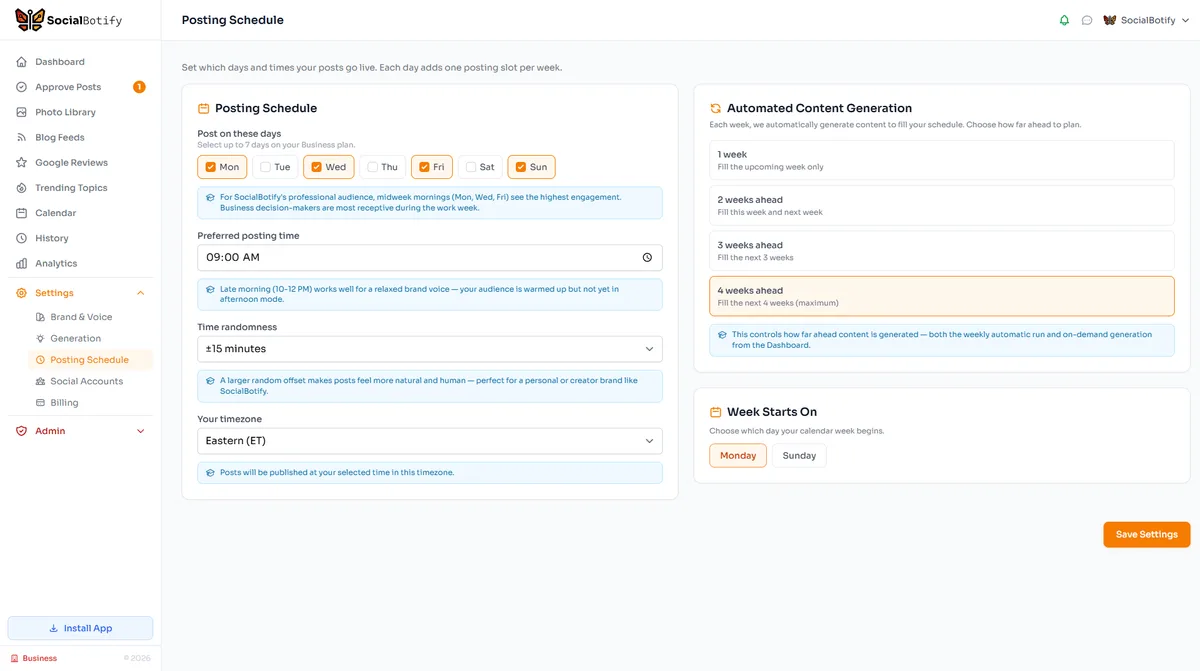
Posts are scheduled for peak LinkedIn engagement windows so your content hits feeds when professionals are most active.
Cross-Platform Publishing
One post becomes ten. Content is adapted for LinkedIn, Instagram, X, Facebook, and six more platforms simultaneously.
The result: your LinkedIn schedule fills itself. You spend about five minutes per week reviewing and approving posts instead of hours writing them. The AI follows your content pillars, maintains your professional voice, and handles the publishing. You stay in full control of what gets posted while the tool does the heavy lifting.
What Are the Best Times to Post on LinkedIn in 2026?
Optimal times vary by audience type. Use this table as a starting point and refine based on your own LinkedIn analytics data.
| Day | B2B / SaaS | Recruiters | Thought Leaders | Job Seekers |
|---|---|---|---|---|
| Monday | 10 AM - 12 PM | 9 AM - 11 AM | 8 AM - 10 AM | 7 AM - 9 AM |
| Tuesday | 8 AM - 10 AM | 9 AM - 11 AM | 7 AM - 9 AM | 8 AM - 10 AM |
| Wednesday | 8 AM - 10 AM | 10 AM - 12 PM | 8 AM - 10 AM | 9 AM - 11 AM |
| Thursday | 9 AM - 11 AM | 10 AM - 12 PM | 7 AM - 9 AM | 8 AM - 10 AM |
| Friday | 9 AM - 11 AM | 8 AM - 10 AM | 9 AM - 11 AM | 7 AM - 9 AM |
| Saturday | Low activity | Low activity | 10 AM - 12 PM | 10 AM - 12 PM |
| Sunday | Low activity | Low activity | 5 PM - 7 PM | 6 PM - 8 PM |
Times shown in your audience's local timezone. Orange indicates peak engagement windows. Sources: Sprout Social, HubSpot, 2026.
LinkedIn Scheduling FAQ
Let AI Schedule Your LinkedIn Posts
Stop spending hours writing posts and timing publications. SocialBotify generates, schedules, and publishes your LinkedIn content automatically.
No credit card required · Cancel anytime