How to Schedule Instagram Posts
Stop posting on the fly and hoping for the best. This step-by-step guide shows you how to plan, write, and schedule Instagram content that actually grows your audience.
No credit card · 7-day free trial · From $19/mo
Why Schedule Instagram Posts Instead of Posting Manually?
Posting to Instagram in real time sounds simple until you realize it means interrupting your workday every time you need to publish. You have to find an image, write a caption, choose hashtags, and hit publish, all while trying to remember whether you already posted this week. Scheduling eliminates that daily scramble by letting you plan and prepare content in a single focused session, then let automation handle the rest.
Hootsuite's 2026 Social Trends report found that brands posting on a consistent schedule see up to 3x higher engagement rates than those posting sporadically. The Instagram algorithm specifically favors accounts that demonstrate predictable posting patterns because it signals to the platform that your account is active, trustworthy, and worth surfacing to more users. When you schedule posts, you lock in that consistency without relying on willpower or memory.
There is also a quality benefit. When you batch-create content ahead of time, you write better captions because you are not rushing. You can review your feed grid to make sure the visual flow looks cohesive. You can spot gaps in your content mix before they happen. Scheduling is not just a time-saver; it is a quality multiplier that transforms Instagram from a daily chore into a strategic marketing channel. If you are managing social media automation across multiple platforms, scheduling becomes even more critical.
Step 1: Plan Your Content Mix
Before you write a single caption, decide what types of content you will post and in what ratio. A random assortment of posts confuses your audience and makes your profile look unfocused. The most effective Instagram accounts follow a deliberate content mix that balances value, entertainment, and promotion.
A proven framework for Instagram is the 40/30/20/10 split: 40% educational content (tips, tutorials, how-tos), 30% entertaining or relatable content (behind-the-scenes, memes, stories), 20% promotional content (product features, testimonials, offers), and 10% community engagement (polls, questions, user-generated content reposts). This keeps your feed interesting while still driving business results. Build this into your content strategy from the start.
Educational
Tips, tutorials, industry insights, and how-to carousels that teach your audience something useful.
Entertaining
Behind-the-scenes, relatable moments, team stories, and lighter content that humanizes your brand.
Promotional
Product showcases, customer testimonials, special offers, and direct calls to action.
Community
Polls, questions, UGC reposts, and engagement-driven content that builds conversation.
Step 2: Write Captions and Select Visuals
Instagram captions are more important than most people realize. While the image stops the scroll, the caption drives engagement, saves, and shares. HubSpot's State of Marketing report shows that Instagram posts with captions over 70 words generate significantly higher engagement than short one-liners, especially for business accounts. The key is structuring your caption with a hook, value, and a call to action.
Start every caption with a strong first line. Instagram truncates captions after about 125 characters, so your opening needs to earn the tap on "more." Use a bold statement, a surprising statistic, or a direct question. Then deliver value in the body: a tip, a story, or an insight. End with a clear CTA like "Save this for later," "Tag someone who needs this," or "Drop a comment below." An AI caption generator can help you produce these consistently without spending thirty minutes per post.
Caption Structure That Works
For visuals, maintain a consistent aesthetic across your grid. Choose a color palette that reflects your brand and stick with it. High-quality photos outperform stock images, but well-chosen stock can work when paired with strong captions. If you are scheduling a week of posts at once, preview the grid layout to make sure adjacent images complement each other visually.
Step 3: Choose Optimal Posting Times
Timing matters on Instagram because the algorithm gives a visibility boost to posts that receive early engagement. Understanding how the Instagram algorithm ranks content in 2026 is essential here. If you publish when your audience is asleep or busy, your post misses that initial surge of likes and comments, and the algorithm buries it. Scheduling lets you consistently hit the right windows without having to watch the clock.
Sprout Social's analysis of millions of Instagram posts confirms that Tuesday, Wednesday, and Thursday mornings between 9 AM and 11 AM consistently produce the highest engagement rates. However, your specific audience may differ, so always cross-reference general data with your own Instagram Insights.
The best approach is to start with industry benchmarks, test different time slots over two to three weeks, and then lock in the times that generate the most engagement for your account. Once you know your optimal windows, scheduling tools make it easy to post at those exact times every week. For a deeper look at frequency across all platforms, read our posting frequency guide.
Step 4: Use AI to Automate the Entire Process
Steps 1 through 3 give you a solid workflow, but executing it manually every week still takes significant time. Writing captions, sourcing visuals, scheduling posts, and adapting content for different formats adds up fast. This is where AI scheduling tools change the equation entirely, handling the repetitive work so you can focus on strategy and engagement.
SocialBotify's AI post generator automates the full Instagram scheduling workflow:
AI Caption Writing
Generates scroll-stopping captions in your brand voice with hooks, value, and CTAs built in automatically.
Smart Image Selection
Automatically pairs each post with relevant stock photos or AI-generated images that match your brand aesthetic.
Optimal Time Scheduling
Posts are scheduled at peak engagement windows so you never miss the timing that matters most for reach.
Cross-Platform Publishing
One post becomes ten. Content is adapted for Instagram, LinkedIn, X, Facebook, and six more platforms simultaneously.
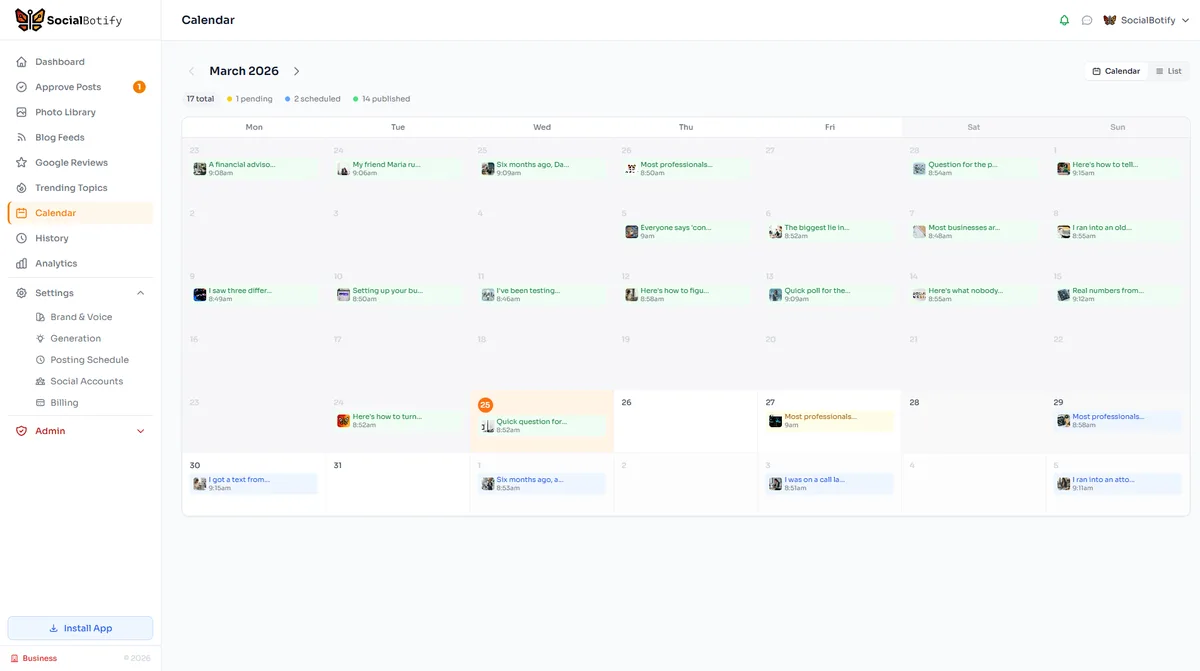
The result: your Instagram schedule fills itself. You spend about five minutes per week reviewing and approving posts instead of hours creating them. The AI follows your content mix, maintains your brand voice, and handles the publishing. You stay in control of what gets posted while the tool does the heavy lifting.
What Are the Best Times to Post on Instagram in 2026?
These times are based on aggregate engagement data across business accounts. Always cross-reference with your own Instagram Insights for the best results.
| Day | Best Time | Engagement Level |
|---|---|---|
| Monday | 11 AM - 1 PM | Moderate |
| Tuesday | 9 AM - 11 AM | High |
| Wednesday | 9 AM - 11 AM | High |
| Thursday | 10 AM - 12 PM | High |
| Friday | 9 AM - 11 AM | Moderate |
| Saturday | 10 AM - 12 PM | Low - Moderate |
| Sunday | 10 AM - 1 PM | Low |
Times shown in your audience's local timezone. Source: Sprout Social, 2026.
Instagram Scheduling FAQ
Let AI Schedule Your Instagram Posts
Stop spending hours writing captions and timing posts. SocialBotify generates, schedules, and publishes your Instagram content automatically.
No credit card required · Cancel anytime