Best Time to Post on Instagram in 2026
The best time to post on Instagram in 2026 is Tuesday through Thursday between 9 AM and 11 AM in your audience's local timezone. These mid-morning windows consistently produce the highest engagement rates across industries, according to research from Sprout Social and Later.
No credit card required · 7-day free trial · Plans from $19/mo
Why Does Posting Time Matter on Instagram?
Instagram's algorithm decides how many people see your post within the first hour of publishing. When you post at a time your followers are actively scrolling, your content collects likes, comments, saves, and shares quickly. The algorithm interprets this burst of early engagement as a signal that the post is valuable, and it pushes the content to a wider audience through the Explore page, hashtag feeds, and the Reels tab. Post at the wrong time and your content gets buried before it has a chance to gain traction.
Sprout Social's 2026 analysis of engagement data across millions of Instagram posts confirms that timing is the single most controllable variable affecting organic reach. Unlike content quality, which is subjective, or follower count, which takes months to build, adjusting your posting schedule can produce measurable results within a single week. Brands that switched from random posting to a data-driven schedule saw an average engagement increase of 23% in the first month.
This is also why scheduling tools have become essential for serious Instagram marketers. Manually posting at 9:47 AM every Tuesday is unreliable. A scheduling tool like SocialBotify ensures your content goes live at the exact minute that maximizes early engagement, even if you are in a meeting, asleep, or on vacation. For a complete walkthrough of setting up an automated posting workflow, read our guide to scheduling Instagram posts.
Best Times to Post on Instagram by Day of Week
Aggregated from Sprout Social, Later, and Hootsuite research covering business accounts across all industries. Times shown in your audience's local timezone.
| Day | Peak Window | Secondary Window | Engagement Level |
|---|---|---|---|
| Monday | 10 AM - 12 PM | 7 PM - 8 PM | Moderate |
| Tuesday | 9 AM - 11 AM | 1 PM - 2 PM | High |
| Wednesday | 9 AM - 11 AM | 5 PM - 6 PM | High |
| Thursday | 9 AM - 11 AM | 12 PM - 1 PM | High |
| Friday | 9 AM - 11 AM | 2 PM - 3 PM | Moderate |
| Saturday | 10 AM - 12 PM | 7 PM - 9 PM | Low - Moderate |
| Sunday | 10 AM - 1 PM | 6 PM - 7 PM | Low |
Sources: Sprout Social, Later, Hootsuite, 2025-2026 data.
How Do Optimal Posting Times Differ by Industry?
General best-time data is a useful starting point, but your industry matters. A B2B software company and a local bakery have fundamentally different audiences with different scrolling habits. Later's 2026 Instagram engagement study found that industry-specific timing adjustments can improve engagement rates by an additional 15 to 25% compared to following generic best-time recommendations. The table below breaks down peak posting windows for five major industry verticals, compiled from Later, Sprout Social, and Hootsuite data.
| Industry | Best Days | Peak Times | Avoid |
|---|---|---|---|
| B2B / SaaS | Tue - Thu | 9 AM - 11 AM | Weekends |
| Retail / E-commerce | Wed, Fri, Sat | 11 AM - 1 PM | Early mornings |
| Food & Beverage | Fri - Sun | 11 AM - 1 PM, 5 PM | Mon mornings |
| Fitness / Wellness | Mon, Wed, Sat | 6 AM - 8 AM, 5 PM | Late nights |
| Real Estate | Thu, Sat, Sun | 9 AM - 11 AM | Fri afternoons |
Notice the pattern: B2B audiences are active during work hours on weekdays because they scroll Instagram during breaks. Retail and food audiences skew toward lunch hours and weekends when people are browsing and planning purchases. Fitness audiences check Instagram early in the morning before workouts and in the evening wind-down window. Real estate prospects are most active on weekends when they have time to browse listings. Use these patterns as a baseline and refine them with your own Instagram Insights data over two to three weeks of testing.
What Changed in the Instagram Algorithm in 2025 and 2026?
Instagram made several significant algorithm updates in late 2025 and early 2026 that directly affect how timing impacts your reach. Understanding these changes is critical for anyone trying to optimize their posting schedule this year.
Hootsuite's 2026 Social Trends report documented three major shifts in how Instagram distributes content. First, the algorithm now weights the first 30 minutes of engagement more heavily than it did in previous years. Posts that receive saves and shares in that initial window get a disproportionately large reach boost compared to posts that accumulate engagement slowly over hours. This means posting when your audience is actively online is more important than ever.
Second, Instagram expanded its interest-based distribution in early 2026. The algorithm now sends content to non-followers who have demonstrated interest in similar topics, even from smaller accounts. This means a well-timed post from a 500-follower account can appear in the Explore feeds of tens of thousands of users if the early engagement signals are strong enough. Timing is the trigger that unlocks this broader distribution.
Third, Reels now share the same timing sensitivity as feed posts. In 2024, Reels had a longer distribution window and timing mattered less. The 2025 update aligned Reels distribution with feed post behavior, making the first hour of engagement equally critical for both formats. If you are posting Reels, scheduling them for peak engagement windows is just as important as timing your static posts.
Critical Window
Early engagement in the first 30 minutes now drives up to 60% of a post's total organic reach.
Interest-Based Reach
Well-timed posts from small accounts now reach non-followers through expanded topic matching.
Unified Timing
Reels now follow the same first-hour engagement logic as feed posts. Timing matters equally for both.
How Do You Find Your Own Best Posting Time?
Industry benchmarks give you a strong starting point, but the most accurate posting times come from your own audience data. Every account has a slightly different follower distribution across time zones, demographics, and usage patterns. The goal is to use general research as a launchpad and then refine with your own analytics over two to four weeks of structured testing.
Start by checking your Instagram Insights under the Audience tab. This shows when your followers are most active by hour and by day. Compare this data to the industry benchmarks above and look for overlap. If your followers peak at 10 AM on Wednesdays and the industry data says the same, you have a high-confidence window. If they diverge, trust your own data for the first round of tests and measure the results.
Testing Framework for Finding Your Peak Times
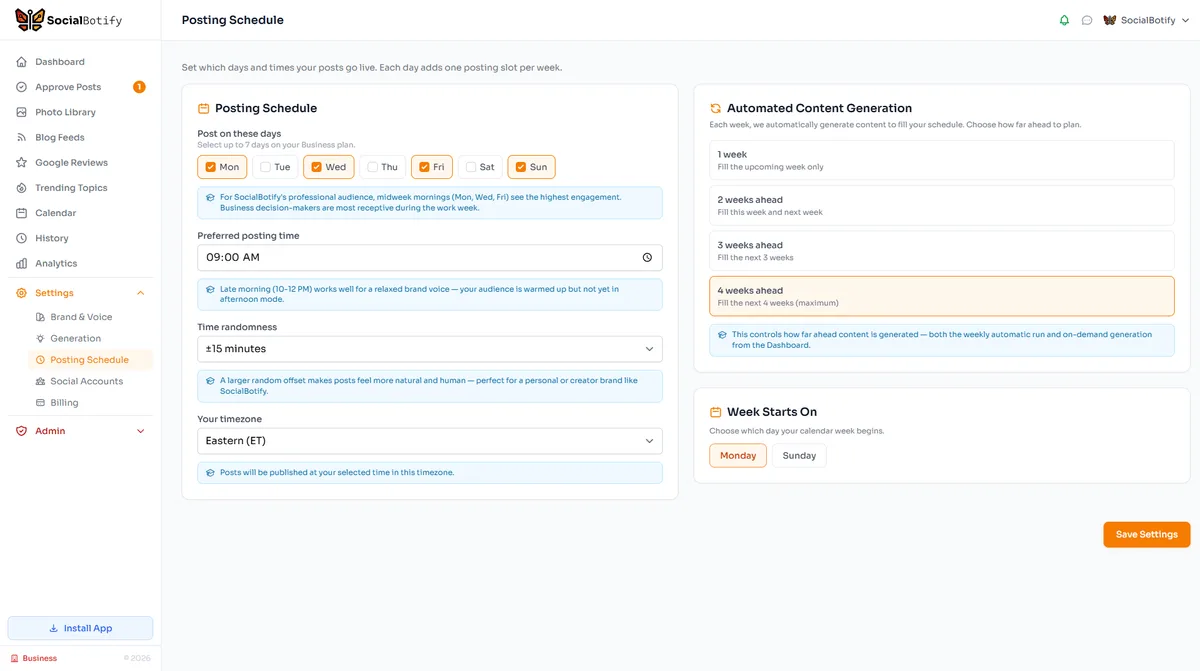
Once you identify your peak windows, use a scheduling tool to lock them in permanently. SocialBotify lets you set preferred posting times for each day of the week, and the AI automatically generates and schedules content for those exact slots. You can also use our Instagram caption generator — or learn the prompting approach behind it in our AI Instagram captions guide — to produce on-brand captions for each scheduled post, reducing your weekly effort to a few minutes of review and approval.
When Should You Avoid Posting on Instagram?
Knowing when not to post is just as valuable as knowing the best times. Sprout Social's data consistently shows that posting between 1 AM and 5 AM in your audience's timezone produces the lowest engagement rates, often less than half the impressions of the same content posted during peak hours. Late Sunday evenings and very early Monday mornings are also dead zones for most business accounts.
Major holidays and long weekends tend to suppress engagement for business content, though lifestyle and entertainment brands may see the opposite effect. If your audience is primarily in one country, be aware of national holidays that shift browsing behavior. For global audiences, focus on the timezone where the largest share of your followers are located and treat that as your primary scheduling anchor.
Another common mistake is posting multiple times within the same hour. Instagram limits how much it shows from a single account in a short window, so spacing your posts at least four to six hours apart ensures each one gets a fair shot at the algorithm. If you are managing social media automation across multiple platforms, stagger your publishing times rather than blasting all platforms simultaneously.
Instagram Posting Times FAQ
Post at the Perfect Time, Every Time
SocialBotify generates your Instagram content and schedules it at peak engagement windows automatically. No guesswork, no manual posting.
No credit card required · 7-day free trial · Plans from $19/mo