ChatGPT for Social Media: Prompts, Tips & Honest Limits
A practical prompt library for every platform, plus a clear-eyed look at what ChatGPT does well and where dedicated tools pick up the slack.
No credit card required · 7-day free trial · Plans from $19/mo
Key Takeaways

Why Does ChatGPT Work So Well for Social Media Content?
ChatGPT genuinely excels at the early stages of social media content creation. It can take a vague idea like "write something about our product launch" and turn it into a polished draft in under ten seconds. That speed alone makes it valuable. Where traditional copywriting requires staring at a blank page, ChatGPT eliminates writer's block entirely. You describe what you want, and you get a starting point that is often 70-80% of the way there. For small business owners who wear ten hats and cannot justify hiring a social media manager, that is a meaningful advantage.
ChatGPT is also surprisingly good at tone adaptation. Ask it to rewrite the same message as casual, professional, or humorous and the results are distinct and usable. A Hootsuite Social Trends report found that brands posting with a consistent, distinctive voice see 33% higher engagement than those with a generic corporate tone. ChatGPT can mimic that distinctiveness when you give it enough direction. It handles hashtag research, can suggest posting times based on general best practices, and generates content variations so you are not saying the same thing three times across platforms.
The bottom line is that ChatGPT is a capable writing assistant for social media. The question is not whether it can help, because it clearly can. The question is whether copying and pasting from a chat window is the most efficient way to manage your social presence long term. For occasional posts, absolutely. For a consistent multi-platform strategy, there are friction points worth understanding before you commit to a ChatGPT-only workflow.
What Are the Best ChatGPT Prompts for Social Media Posts?
Below are 18 ready-to-use prompts organized by platform and content type. Copy them directly into ChatGPT and replace the bracketed placeholders with your details. Each prompt is engineered to produce output that avoids the most common AI-sounding pitfalls. For an even larger library, see our companion post: 50 ready-to-use ChatGPT prompts for social media organized by platform.
LinkedIn Prompts
1. Thought Leadership Post
Write a LinkedIn post from the perspective of a [YOUR ROLE] in the [YOUR INDUSTRY] industry. Share a contrarian opinion about [TOPIC]. Start with a bold, scroll-stopping first line. Use short paragraphs. Include one specific example from real experience. End with a question that invites discussion. No hashtags, no emojis, no corporate jargon. Keep it under 1,300 characters.
2. Career Lesson Post
Write a LinkedIn post about a career mistake I made: [DESCRIBE THE MISTAKE]. Frame it as a lesson, not a humble brag. Use first person. Be specific about what happened, what I learned, and what I do differently now. Conversational tone, like talking to a colleague over coffee. Under 1,200 characters.
3. Industry Trend Analysis
Write a LinkedIn post analyzing [TREND] in the [INDUSTRY] space. Open with a surprising statistic or counterintuitive observation. Explain what most people get wrong about this trend. Share what I'm seeing in practice as a [YOUR ROLE]. End with a forward-looking prediction. Professional but not stiff. Under 1,300 characters.
Twitter / X Prompts
4. Hot Take Tweet
Write a punchy tweet (under 280 characters) with a hot take about [TOPIC] in the [INDUSTRY] niche. Make it opinionated and slightly provocative but defensible. No hashtags. Write it like someone who actually works in this field, not a marketing textbook.
5. Thread Starter
Write a 5-tweet thread about [TOPIC]. First tweet should hook readers with a bold claim or surprising number. Each subsequent tweet should be one clear point with a concrete example. Final tweet should summarize the takeaway and invite replies. Each tweet under 280 characters. No emojis in the first tweet.
6. Engagement Question
Write a tweet that asks [YOUR AUDIENCE] a specific question about [TOPIC]. The question should be easy to answer in a reply (not a paragraph). Make it feel like a real conversation, not a poll. Under 200 characters so people can quote-tweet with their answer.
Instagram Prompts
7. Story-Driven Caption
Write an Instagram caption for a [TYPE OF IMAGE: behind-the-scenes / product / team photo]. Start with a hook that makes people tap "more." Tell a short story about [WHAT HAPPENED]. End with a call to action (comment, save, or share). Casual, warm tone. Include 3-5 relevant hashtags at the end. Under 2,200 characters.
8. Carousel First Slide Text
Write text for a 7-slide Instagram carousel about [TOPIC]. Slide 1: a bold headline that makes someone stop scrolling (under 10 words). Slides 2-6: one actionable tip per slide with a short explanation (under 40 words each). Slide 7: a summary + CTA to follow for more. Write for a [YOUR AUDIENCE] audience.
9. Reel Script
Write a 30-second Instagram Reel script about [TOPIC]. Hook in the first 2 seconds (a question or surprising statement). Three quick points delivered in a punchy, conversational style. End with a CTA to comment or follow. Write it as spoken word, not written text. Include a suggested caption with 5 hashtags.
Facebook Prompts
10. Community Discussion Post
Write a Facebook post for a [TYPE OF BUSINESS] page that starts a conversation with followers. Topic: [TOPIC]. Share a brief personal take or behind-the-scenes detail, then ask an open-ended question that's easy and fun to answer. Friendly, approachable tone. No links. Under 500 characters.
11. Product/Service Highlight
Write a Facebook post promoting [PRODUCT/SERVICE] without sounding salesy. Lead with the problem it solves, not the features. Include a short customer quote or result if available: [CUSTOMER RESULT]. End with a soft CTA like "Link in comments" or "DM us for details." Warm and genuine. Under 600 characters.
Pinterest Prompts
12. Pin Description (SEO-Optimized)
Write a Pinterest pin description for a [TYPE OF CONTENT: blog post / product / recipe / tutorial] about [TOPIC]. Include the keywords [KEYWORD 1] and [KEYWORD 2] naturally. Describe what the viewer will learn or get. Add a CTA to click through. Helpful and specific, not clickbaity. Under 500 characters.
Reddit Prompts
13. Value-First Discussion Post
Write a Reddit post for r/[SUBREDDIT] sharing a genuine lesson about [TOPIC]. Write in first person as someone who has real experience, not as a brand. Be direct, slightly self-deprecating, and avoid anything that sounds like marketing. Share specific numbers or results. End with a question to spark discussion. No emojis, no hashtags, no links.
14. AMA-Style Introduction
Write a Reddit post introducing myself for an informal AMA in r/[SUBREDDIT]. I'm a [YOUR ROLE] with [X YEARS] experience in [INDUSTRY]. Mention 2-3 specific accomplishments that establish credibility without bragging. Offer to answer questions about [TOPICS]. Casual Reddit tone. No corporate speak.
Threads & Bluesky Prompts
15. Conversational Take (Threads)
Write a Threads post sharing a quick take on [TOPIC]. Threads is conversational and casual, like texting a smart friend. One to three short sentences. No hashtags. Express an opinion or observation that invites people to reply with their own experience. Under 500 characters.
16. Bluesky Introduction Post
Write a Bluesky post introducing myself and what I post about. I'm a [YOUR ROLE] interested in [TOPICS]. Keep it friendly, informal, and under 300 characters. Mention what kind of conversations I want to join. No marketing language.
Multi-Platform Prompts
17. Repurpose One Idea Across Platforms
Take this idea: "[YOUR CORE MESSAGE]" and write it as: 1) A LinkedIn post (under 1,300 chars, professional but conversational), 2) A tweet (under 280 chars, punchy), 3) An Instagram caption (under 2,200 chars, story-driven with 5 hashtags), 4) A Facebook post (under 500 chars, friendly). Each version should feel native to the platform, not a copy-paste of the same text.
18. Week of Content from One Topic
Create 5 social media posts for one week, all based on the theme "[YOUR THEME]." Mix these formats: one educational tip, one personal story, one question/poll, one myth-busting take, one promotion with a soft CTA. Write each for [PLATFORM] with the appropriate tone and length. Make each post stand alone so they don't feel repetitive.
How Do You Write Better ChatGPT Prompts for Social Media?
The prompts above follow a pattern you can replicate for any situation. The difference between a prompt that produces generic filler and one that produces publishable content comes down to five elements. First, specify the platform and its constraints. ChatGPT does not automatically know that tweets max out at 280 characters or that LinkedIn truncates posts after about three lines. Tell it. Second, define the audience. "Write for SaaS founders with 10-50 employees" produces radically different output than "write for small business owners." Third, set the tone with comparisons: "write like a newsletter, not a press release" gives ChatGPT a reference point that abstract words like "professional" simply cannot match.
Fourth, and this is the step most people skip, tell ChatGPT what not to do. "No emojis, no hashtags, don't start with 'I'm excited to share,' don't use the word 'leverage'" is more useful than any positive instruction because it blocks the AI's most generic defaults. A HubSpot analysis of AI-generated social content found that posts with explicit negative constraints scored 40% higher in authenticity ratings from human reviewers. Fifth, include something specific to you: a real metric, a client story, a personal opinion. This is the raw material that makes AI output feel human. Without it, you get content that could have been written by anyone for anyone.
One more practical tip: use ChatGPT's conversation memory to your advantage. Start each session by pasting a short "brand brief" describing your company, audience, and voice. Then every subsequent prompt in that session inherits that context. This partially solves the brand consistency problem, though it does require re-pasting at the start of every new conversation, which is one area where dedicated tools offer a permanent solution.
Where Do Purpose-Built Tools Outperform ChatGPT?
ChatGPT is a general-purpose language model. It writes social media posts the same way it writes essays, emails, and code: by generating text based on your prompt. That generality is a strength for brainstorming and a weakness for production-level social media management. Here are the specific areas where purpose-built social media automation tools consistently save time and reduce errors compared to a ChatGPT-only workflow.
Brand voice persistence is the most significant gap. Every new ChatGPT conversation starts from zero. You have to re-explain your brand, audience, and tone preferences every time. According to Sprout Social research, 45% of consumers unfollow brands on social media because of irrelevant content, and inconsistent voice is a primary driver. Purpose-built tools like SocialBotify analyze your website and past content to build a permanent voice profile that shapes every post without repeated instructions. That consistency compounds over weeks and months in a way that session-based prompting cannot replicate.
Then there are the operational tasks ChatGPT simply cannot do. It cannot publish to your accounts, cannot schedule posts for optimal times, cannot enforce exact character limits per platform, and cannot adapt a single piece of content into platform-native variants automatically. With ChatGPT, you write the post, then manually copy it into each platform's composer, check character counts, adjust formatting, and hit publish. With a tool like SocialBotify, the AI generates platform-optimized variants, you review and approve them in one screen, and they publish on schedule across all your connected accounts. For someone posting to three or more platforms consistently, that operational difference adds up to hours every week.
ChatGPT Strengths
- ✓ Fast brainstorming and ideation
- ✓ Flexible tone adaptation
- ✓ Great for one-off content needs
- ✓ Free tier available
- ✓ Works for any type of writing
Purpose-Built Tool Strengths
- ✓ Persistent brand voice memory
- ✓ Automatic platform-specific formatting
- ✓ Built-in scheduling and publishing
- ✓ Content calendar and strategy
- ✓ Review and approval workflows
Frequently Asked Questions
Want to see how AI-powered automation compares to manual posting? Read our complete guide to social media automation.
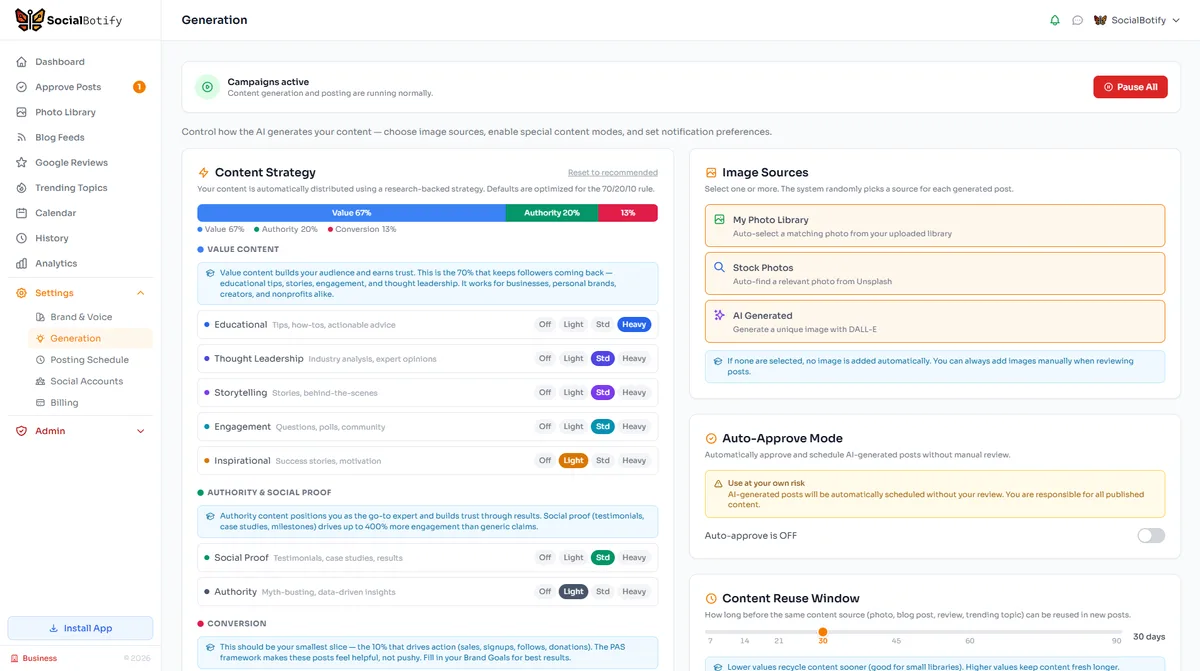
ChatGPT Writes the Draft. SocialBotify Runs the Strategy.
Go beyond copy-paste. SocialBotify learns your brand voice, generates platform-native content, and publishes on schedule across all your accounts.
Start Your Free Trial →No credit card required · Cancel anytime