Workflow Guide · May 2026
5 Minutes a Week: How Professionals Use SocialBotify to Stay Active on Social Media
A practical workflow for CPAs, attorneys, and consultants who want a real social media presence without giving up an afternoon every week.
No credit card required · 7-day free trial · Plans from $19/mo

Is 5 Minutes a Week Really Enough for Social Media?
The catch worth naming up front: five minutes assumes you've spent maybe 20 minutes during onboarding telling the AI who you are, what you do, and who you serve. After that, the weekly time investment really does drop to a single short review session. According to Hootsuite's 2026 Social Trends report, 65% of social media professionals cite content creation as their most time-consuming task. Removing the writing step is what makes a 5-minute weekly routine realistic for busy professionals.
The Monday Morning Setup
Here is what the five minutes actually looks like for a CPA we'll call Marcus, who runs a small tax practice in Charlotte. On Monday at 8:15am, with his first coffee, he opens the SocialBotify content calendar in a browser tab. A week of drafts is already waiting for him because the platform generates the next seven days of posts every Sunday night based on his brand voice and content pillars.
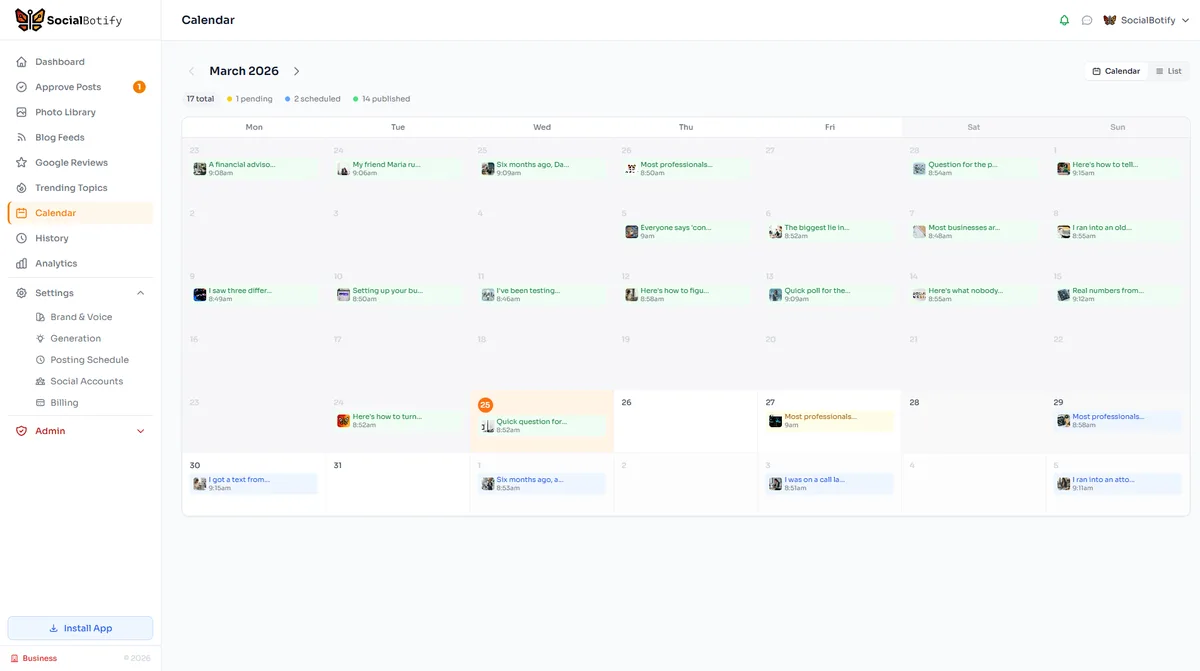
The calendar view shows each scheduled post as a card, color-coded by platform, on the day and time it will publish. Marcus skims the LinkedIn post planned for Monday afternoon, taps it, and sees the full draft. The opening line catches his eye: "The IRS just clarified how the new R&D capitalization rules apply to software development costs. Here's what most small business owners are missing." He recognizes his own voice in the post because the AI post generator learned how he writes during onboarding. He changes one phrase, clicks approve, and moves on.
Wednesday's post is a behind-the-scenes piece about how his practice approaches year-round tax planning rather than just March-to-April work. It needs no edits. Friday's post is a question to his audience about a recent tax policy headline. He approves it. The whole review takes 4 minutes and 38 seconds. He closes the tab and gets back to client work. The next time he thinks about social media is the following Monday, when the cycle repeats.
The interface is built around this exact pattern. You don't navigate through menus to find drafts. The week's posts are the first thing you see when you log in. Approval is a single click. Edits happen in a modal that opens without leaving the calendar view. The whole product is shaped by the assumption that your time is the scarcest thing in the workflow.
What the AI Does While You're Working
Between Marcus closing the tab on Monday morning and opening it the following Monday, the AI is doing the work that would otherwise sit on his to-do list. It's applying a content mix framework, picking topics based on his practice area, and adapting each post to the platform where it will publish. The framework it follows is called 70/20/10, and it's the same ratio professional marketers have used for years to keep social feeds from feeling like an ad. Seventy percent of posts educate, twenty percent share a professional perspective, and ten percent promote a specific service or outcome. You can read the full breakdown in our 70/20/10 social media rule guide.
In plain language: most of the time the AI is teaching Marcus's audience something useful, sometimes it shares his point of view on an industry trend, and occasionally it mentions that he takes on new clients. The mix gets applied automatically. Marcus never has to count posts or decide whether this week is "promo week." The platform tracks his recent post history and balances the calendar so it stays inside the ratio. That balance is what keeps an audience engaged. A feed that's 100% promotional gets unfollowed within a month. A feed that's 100% educational builds trust but rarely converts. The 70/20/10 split is the practical middle.
The AI also handles platform adaptation. The same idea gets a long, analytical treatment for LinkedIn, a tighter, more conversational version for Twitter, and a visual-first caption for Instagram. Each platform has its own conventions, and writing for all of them by hand is what eats most of the time professionals lose to social media. SocialBotify supports ten platforms (LinkedIn, Twitter/X, Facebook, Instagram, Threads, Bluesky, Pinterest, Reddit, Google Business, and Telegram), and the adaptation happens server-side without you choosing settings.
See your own week of posts generated before you commit to anything.
Start Your Free Trial →No credit card required · 7-day free trial · Plans from $19/mo · See all plans
A Real Week of Posts: What Goes Out and When
Here's a representative week for Marcus, the CPA from the Monday setup section. The cadence is three posts a week (Mon/Wed/Fri), LinkedIn-led, with one cross-post to Instagram where the topic carries a visual angle. This pattern matches what Buffer's analysis of LinkedIn posting frequency recommends as the sweet spot for engagement without diminishing returns.
Three posts, two platforms, one tight workflow. Marcus's audience hears from him on the days they're most likely to be at a desk, with content that swings between teaching, showing his approach, and inviting conversation. The Instagram crossover on Wednesday adds a different audience touchpoint without adding work, because the platform produces the IG caption from the LinkedIn source automatically.
How Professionals Customize Without Spending Hours
The whole approach hinges on the AI actually sounding like you. Generic AI output is the reason most automated social media programs read as obvious filler. The customization that matters happens once, during onboarding, and then quietly informs every post the platform generates after that. There are three pieces.
First, brand voice. You describe how your practice talks (formal, direct, dry-humored, plain-spoken) and paste a few existing posts or articles you've written. The AI fits a voice profile from those inputs, so the drafts that come back the next Monday read closer to your natural style than a stock LinkedIn prompt would produce. Our guide on AI brand voice configuration walks through the inputs that move the needle most, and which fields are safe to skip if you're short on time.
Second, industry-specific templates. A CPA's content pillars are different from a litigation attorney's. The platform applies templates tuned to your profession so the topic suggestions feel relevant out of the box. For accountants that means tax updates, entity-structure posts, year-end planning hooks, and benchmarking content. For attorneys it skews toward case commentary, regulatory updates, and plain-language explainers of recent rulings. You don't pick which template, you pick your profession and the platform handles the rest.
Third, ongoing feedback. The few edits you make each week feed back into the voice profile. After a month of light editing, the drafts arrive needing fewer tweaks. After three months, most users report they're approving 90% of posts without changes. None of this requires you to write training prompts. The system learns from the act of approving or editing.
What 5 Minutes Gets You vs. What It Doesn't
Honest expectations matter here. A 5-minute weekly workflow delivers consistency, presence, and a steady drip of education-led content. It is the right tool for a professional who wants to be visible to their network and to show up in search when prospects look them up. It is not a substitute for a full content marketing operation, and we should be clear about that.
If you want to publish a 1,500-word LinkedIn essay every other week, you'll still write that yourself. If your strategy depends on jumping on breaking news within an hour, you'll still log in for that. What the 5-minute workflow handles is the baseline: the steady cadence of useful, voice-correct posts that keeps you in front of your network during the 95% of weeks when nothing dramatic happens. For most service professionals that baseline is exactly what's been missing. Pricing for the workflow starts at our Starter plan and scales up when you need AI image generation or more accounts (see all pricing tiers). The full social media automation platform includes the calendar, the AI generator, and the publishing layer in one tool.
From 5 Minutes to Results: What to Expect in 30/60/90 Days
Social media takes time to compound. Setting honest expectations on the timeline is what separates professionals who stick with a routine from the ones who quit at week three because nothing happened. According to Hootsuite research, the inflection point for most consistent posters lands between 60 and 90 days.
First 30 days. You'll publish about 12 posts. Engagement will be modest. The point of month one is establishing the rhythm and giving the AI feedback through your edits. The voice profile gets sharper. You'll start to notice which post types pull comments from people you actually want to talk to.
Days 31 to 60. Around post 20, profile visits typically pick up. People you've never met start checking your bio. A few existing contacts reach out about something you posted. This is also when the AI starts requiring fewer edits because it has more of your style to work from.
Days 61 to 90. The first inbound conversations that look like they could become clients usually show up here. Not a flood. A few. The goal at 90 days isn't a transformation, it's a consistent presence that you can point new prospects to. After that, the routine compounds quietly. Each month adds posts to your feed that prospects can scroll through when vetting you. The 5 minutes a week stays 5 minutes a week.
Frequently Asked Questions
Photo by Vladislav Šmigelski on Pexels
Give Your Practice 5 Minutes a Week. Get a Real Social Media Presence Back.
SocialBotify writes the posts in your voice, schedules them on the right days, and publishes them while you're with clients. Your job is the Monday morning review.
No credit card required · 7-day free trial · Plans from $19/mo